

Your GCash app updated, then suddenly broke. Maybe it won't log in. Maybe it throws a “feature does not support” error. Maybe your older Android phone was working fine last week, and now you're searching for a GCash APK old version because you just need your wallet app back.
That instinct makes sense. A broken finance app isn't a minor hassle in the Philippines. It affects bills, transfers, load, QR payments, and daily routines. But this is also where many people make the worst possible move. They assume the app version is the problem, download a random APK, and end up creating a bigger security mess than the original error.
I'll be blunt. If you're looking for a GCash APK old version, your first job isn't to download anything. Your first job is to figure out whether you need to downgrade at all. In many cases, you don't.
Table of Contents
- Why You Might Need an Old GCash Version
- The High Stakes of Unofficial APKs
- Diagnosing the Real Problem Before You Downgrade
- How to Find and Install an Older GCash APK
- Smarter Alternatives to Downgrading
- Frequently Asked Questions About Old GCash Versions
Why You Might Need an Old GCash Version
You update GCash, open it, and suddenly something breaks. Login fails. The app crashes. A feature you use every week stops working on an older phone. That frustration is real, and it explains why many Filipinos start looking for an older APK.
Some users want an old version because newer builds can feel heavier on budget devices with limited storage and weaker hardware. Others are trying to get back a version that worked before a bad update, especially if the app started acting up right after installation. That instinct makes sense.
But here's my advice. Don't assume the update itself is necessarily the problem.
A lot of GCash errors come from device security checks, not from the latest app build. Developer Options being enabled is a common trigger. So are USB debugging, mock location settings, app cloning tools, root access, or other phone configurations that make GCash treat the device as unsafe. Many downgrade guides skip that part and push people straight to APK downloads. That is the wrong order.
When looking for an old version is understandable
Your reason is reasonable if you're dealing with something specific like:
- GCash started failing right after an update
- Your Android phone is old and struggles with newer releases
- A feature you rely on became unstable or disappeared
- The app no longer opens after updating
Even then, check the basics first. If Developer Options is on, turn it off and restart the phone. If you use modified Android settings, remove them. If the issue started after a security prompt or device warning, treat that as the main lead, not a side issue.
What you're really trading off
An older GCash build might help with compatibility. It might also create new problems with login checks, account protection, or support. This is a finance app tied to your wallet, identity, and transactions. The safety bar should be much higher than for entertainment apps, even if you also use GCash for cash-ins tied to games that can earn money thru GCash.
So yes, there are valid reasons to want an old GCash version. Just be honest about the goal. If you're trying to fix a security flag, downgrading may do nothing. If you're trying to keep an older phone usable, it can be worth considering, but only after you rule out the actual device-side cause first.
The High Stakes of Unofficial APKs
You find a site offering “GCash old version,” install it in two minutes, and the app opens. That can feel like a win until your OTPs, notifications, or login details are being watched by code you never agreed to install.
This is the critical point. You are not sideloading a casual game. You are installing a wallet app tied to your money, ID checks, transaction history, and device trust signals. If the file is fake or altered, the damage can hit fast and it can be expensive.
Why unofficial old APKs are risky even when they look legit
A lot of downgrade guides act like the only question is whether the APK installs. That is shallow advice. With GCash, you also need to care about where the file came from, whether it was modified, whether it still matches current security checks, and whether it will behave properly once you log in.
Here's what can go wrong:
- Credential theft. A tampered APK can capture your MPIN, password, OTP flow, or other login details.
- Notification and SMS snooping. Malicious code may watch messages and alerts to intercept verification steps.
- Hidden permission abuse. The app can ask for access it does not need, then employ it in the background.
- Missing security fixes. Even a genuine old build can lack protections added in later releases.
- Transaction instability. The app may open but fail during send money, verification, cash-in, or account review steps.
- Security flags. An older build does not guarantee bypassing GCash checks. In some cases, it creates more friction.
A finance app from an unofficial source should be treated as unsafe by default.
The trap most users miss
Attackers do not need to fool everyone. They only need to catch people who are frustrated and in a hurry. That usually means people looking for terms such as “GCash APK old version” right after an update fails, or right before they need to cash in, transfer funds, or withdraw.
That urgency matters. People stop checking signatures, permissions, and source reputation once they just want the app to open again.
You see the same rushed behaviour on pages pushing other APK-style downloads, including PH 777 Casino app download options. The pattern is familiar. Promise a quick fix, push a file, and count on the user not slowing down.
What makes this worse with GCash
GCash is stricter than a lot of apps because it has to be. It checks the device environment, app integrity, and account risk signals. So if your real problem is a security setting on the phone, a downgrade may not solve anything. You still carry the risk of a bad APK, and you may still hit the same block after installing it.
That is why I do not recommend unofficial APKs as a first move. In many cases, the version is not the actual problem at all.
My advice
Do not normalise sideloading GCash from random APK sites. Use it only as a last resort, and only after you rule out device-side causes and safer official options. If a guide skips the risk part and jumps straight to download links, close it.
Diagnosing the Real Problem Before You Downgrade
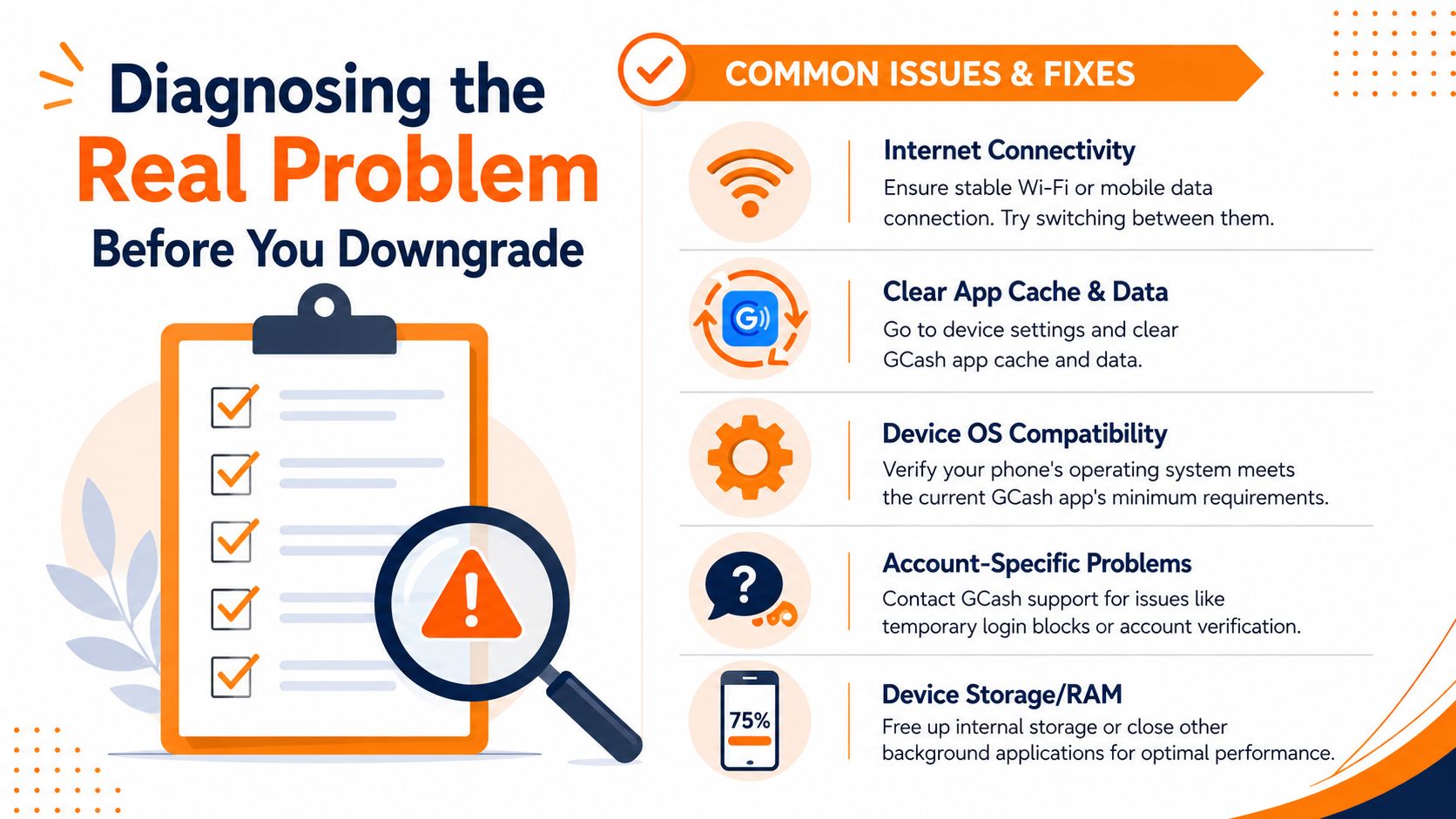
You update GCash, try to log in, and suddenly the app treats your phone like it is compromised. The usual reaction is to hunt for an old APK. Stop there first. On many devices, the block comes from phone settings you switched on for gaming tweaks, USB transfers, app testing, or performance tools, not from the current GCash version.
That matters because a downgrade can waste your time and still leave you locked out. If Developer Options, USB Debugging, or similar settings are active, GCash may still flag the device after you install an older build.
Check these settings first
Run through this list before you download anything:
- Developer Options. Turn it off if you enabled it.
- USB Debugging. Switch it off.
- OEM access or OEM control. Disable it if available and enabled.
- Display over other apps. Review overlay apps, screen filters, floating tools, and auto-clickers.
- App cache and data. Clear both, then restart the phone.
- Root-related tools or virtualization apps. Remove or disable them if present.
GCash is a finance app. It checks for risk signals, not just app version compatibility. A phone can look clean to you and still trip those checks.
Quick decision table
| Situation | What to do first |
|---|---|
| Login fails right after an update | Turn off Developer Options and USB Debugging, then restart |
| “Device is not secure” message appears | Check overlays, OEM settings, root tools, and cloned app tools |
| App opens but behaves strangely | Clear cache, clear data, restart, then sign in again |
| Transactions fail after sideloading | Stop using that APK and return to the Play Store version |
One setting causes a surprising number of these headaches. Developer Options. People enable it for a completely unrelated reason, forget it exists, then assume GCash itself is broken.
Problems users mistake for version issues
Old Android support is one thing. Security checks are another. Mixing them up leads people straight into risky downloads.
If your phone is relatively recent and GCash suddenly started complaining after you changed developer settings, installed a floating utility, used USB debugging, or tested another app, fix that environment first. I have seen users cycle through multiple APKs and get nowhere because the phone setup never changed.
The same pattern shows up in other wallet and payout problems too. People chase files before checking settings, permissions, and account conditions. You can see that mindset in guides about Arena Plus withdrawal steps. The smarter move is simple. Rule out device-side triggers first, then decide whether an older APK is even worth the risk.
How to Find and Install an Older GCash APK
Your phone keeps throwing errors, you already checked the obvious settings, and now you are one search away from downloading the first "GCash old version" APK you see. This is the point where many users make the worst decision.
If you still plan to downgrade, treat it like handling a security risk, not a quick fix. Older builds can install and still fail because GCash's current backend, security checks, or login flows no longer play nicely with that release. A smaller APK or older interface does not mean a better result.
Pick the source carefully
Your biggest risk is not "old app performance." It is installing a tampered finance app.
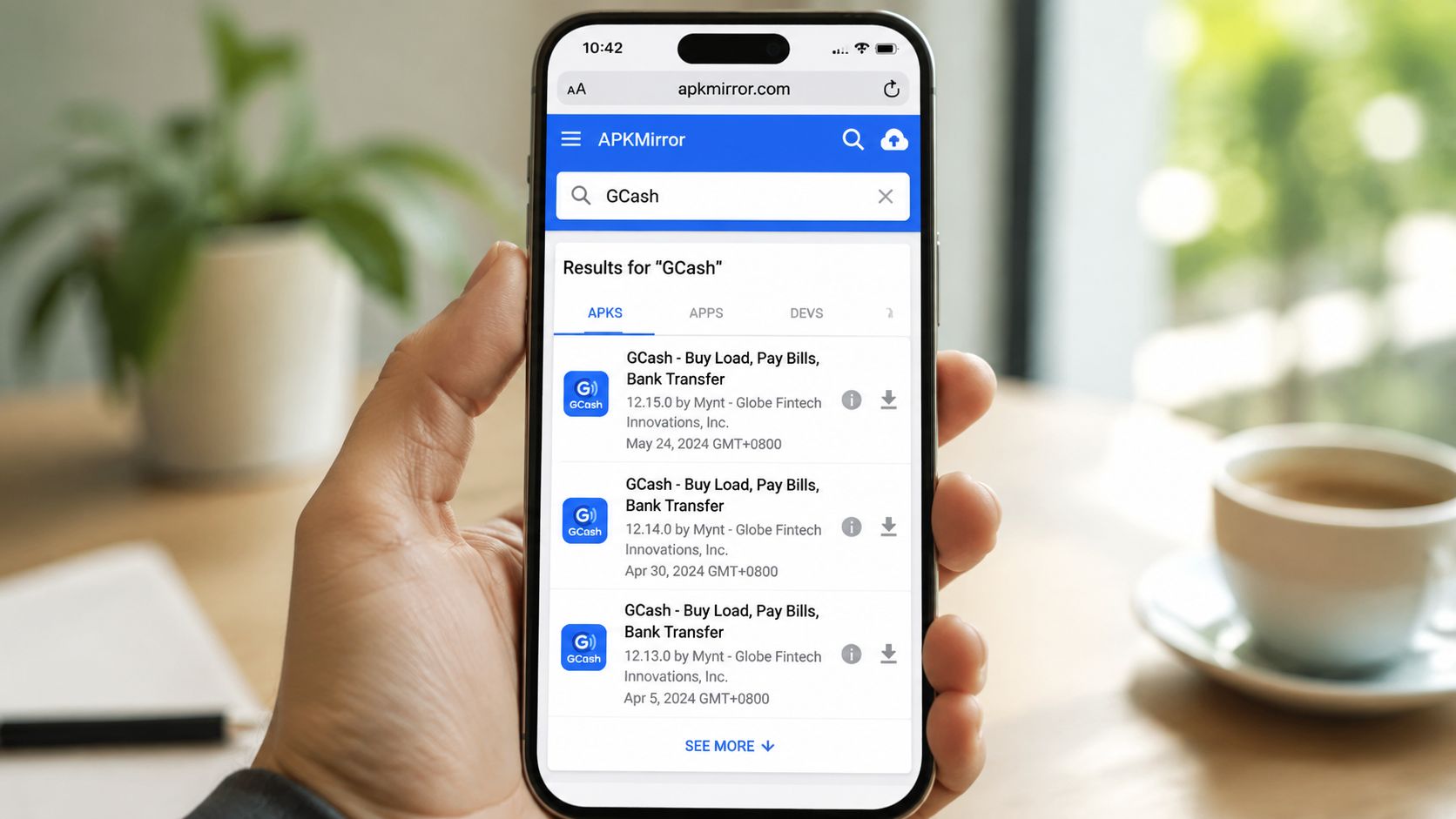
Use these filters before you download anything:
- Stick to known APK archives, not random blogs or Telegram drops. That does not make the file safe. It only lowers the odds of getting obvious malware.
- Skip anything labeled mod, patched, premium, with full functionality, cloned, or no verification. For a wallet app, those labels are a hard stop.
- Check the package name, version history, and publisher details. If the listing looks inconsistent or sloppy, leave.
- Avoid very old releases unless you have a specific reason. The farther back you go, the higher the chance of login errors, broken cash-in flows, or failed verification checks.
A lot of guides skip the core issue here. People blame the version, but the failure often starts with the device environment. If Developer Options, USB Debugging, overlays, root traces, or app-cloning tools are still present, changing APK versions may do nothing except add another risk.
Safer install sequence
Follow a strict order. Do not freestyle this on your main phone if you can avoid it.
- Back up important data on the device.
- Download one APK only. Multiple files make it easier to install the wrong one.
- Scan the APK with Play Protect or your mobile security app.
- Review the app details before opening the file. Check the name, icon, and package info if your device shows it.
- Temporarily enable Install from unknown apps only for the browser or file manager you used.
- Install the APK and sign in carefully.
- Test low-risk actions first. Check if the app opens, loads your account, and displays balances correctly. Do not start with a large transfer.
- Turn off Install from unknown apps immediately after.
If the app asks for unusual permissions, stop right there. A payment app should not be asking for anything that looks unrelated to wallet use.
What careful users still miss
Signature integrity matters. If the APK has been altered, the app may still install, open, and look normal. That is what makes sideloading a finance app dangerous. You usually do not get a dramatic warning before something goes wrong.
My advice is simple. If you cannot judge whether the file is legitimate, do not install it.
Also be realistic about what an old version can and cannot fix. Downgrading may help in a narrow compatibility case, but it will not magically bypass every security check or account-side issue. The same caution applies if you use one phone for wallets, games, and sideloaded apps together. Even people looking up installs for apps such as the 90 Jili Android app guide should keep entertainment sideloading habits separate from anything tied to their money. Finance apps need stricter standards.
Smarter Alternatives to Downgrading
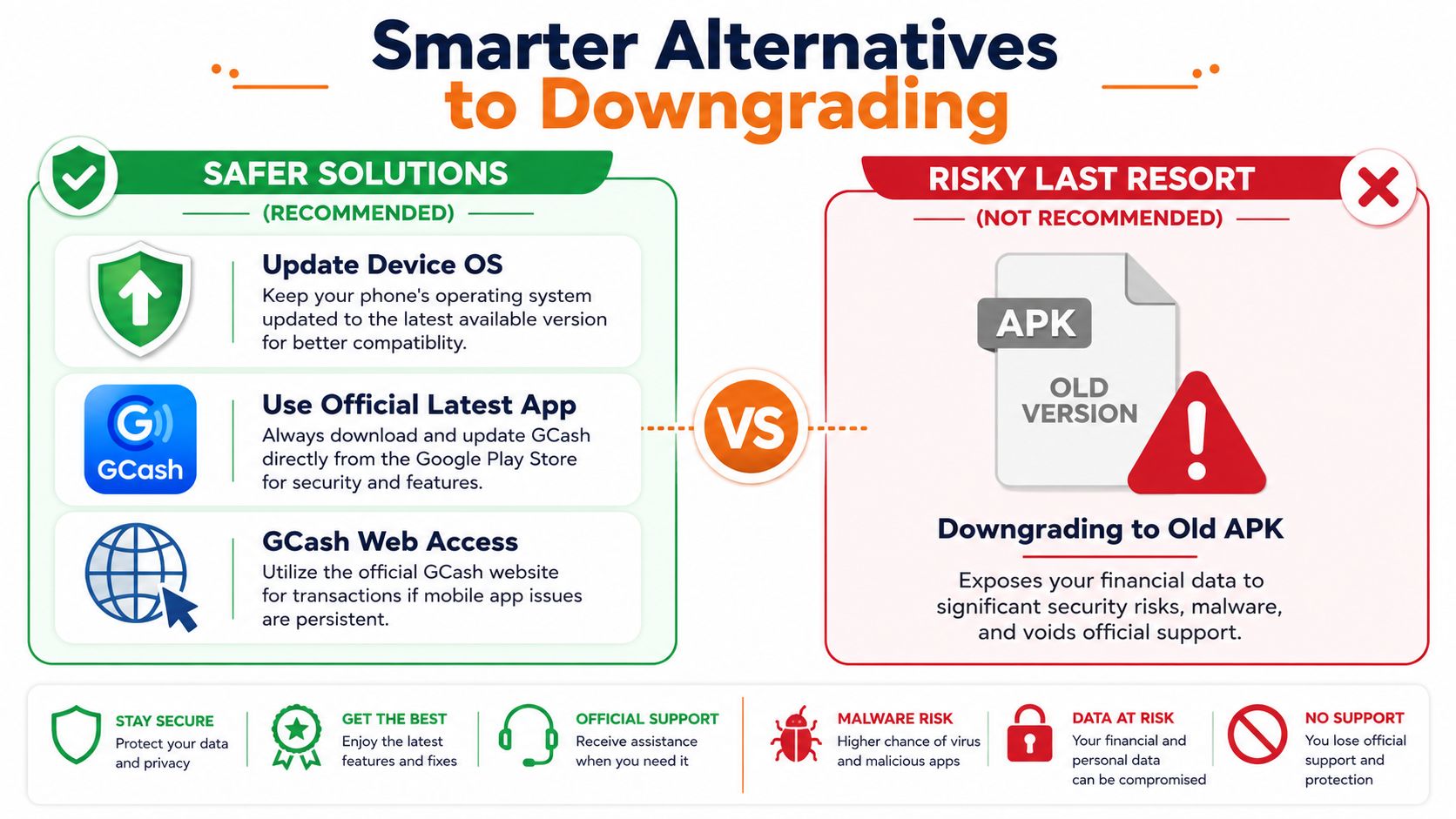
You tap GCash, get blocked by an error, and assume the latest update is the problem. Sometimes it is. A lot of the time, it is your phone setup. Developer Options, USB debugging, mock location, or other flagged settings can trip GCash's security checks even on a supported device. That is why downgrading should sit near the bottom of your list, not the top.
The safer move is to check whether your phone still meets the app's current requirements and whether the issue is really app-related. The official GCash Google Play listing is the right place to confirm device compatibility and app support details. If your phone is too old for the current app, an old APK may open for now, but you are still using a finance app outside the safe path.
Compare the options properly
| Option | Risk | Effort | Best use |
|---|---|---|---|
| Turn off flagged phone settings | Low | Low | First fix for security check errors |
| Reinstall the official app | Low | Low | Good for broken installs or update glitches |
| Update Android OS | Low | Medium | Best fix if your phone still supports newer Android |
| Contact GCash support | Low | Medium | Best for account-specific blocks or unclear errors |
| Install an old APK | High | Medium | Last resort for temporary access only |
What I'd recommend in order
Start with the causes that people ignore:
- Check Developer Options first. If it is on, turn it off and restart the phone.
- Disable USB debugging, mock location, and similar testing settings. These are common triggers for finance app restrictions.
- Reinstall the official Play Store version. That clears a lot of update mess without adding sideloading risk.
- Update your Android version if your phone still supports it. That is a real fix, not a workaround.
- Contact support with the exact error message and your device details. Clear info gets faster answers.
If your device is stuck on an old Android release, be honest about the tradeoff. You are not fixing the root problem. You are stretching the life of a setup that GCash may stop accepting at any time.
The practical long view
If GCash handles your bills, transfers, or cash-ins, use it on a phone that still gets proper app support. It does not need to be expensive. It needs to run a supported Android version and pass basic security checks.
That matters even more if you are dealing with account recovery or identity issues. Tasks like GCash account verification steps and re-verification fixes are easier on a supported device with the official app installed.
Frequently Asked Questions About Old GCash Versions
Is my money safe if I use an old GCash version
You open GCash because you need to send money now, the current app keeps failing, and an old APK looks like the fastest fix. That is exactly when people make risky choices.
An old GCash version is only as safe as the file source, the phone it runs on, and the reason the app failed in the first place. If the problem is a blocked device setting like Developer Options, downgrading does not solve the underlying issue. It just adds another risk on top of it.
Some users in the Reddit thread about the current update issue solution said version 5.90.0 worked for them during a bad update. Treat that as a temporary workaround, not proof that old APKs are broadly safe.
Can I update back to the official version later
Yes. Do that as soon as you can.
If you installed an older build just to get through a short-term app problem, go back to the official Play Store release once the issue is fixed. A finance app should stay current because security checks, bug fixes, and account protections are tied to newer versions.
Why is GCash so strict about Developer Options and similar settings
Because banking and wallet apps do not trust phones that look modified, test-ready, or easier to tamper with.
That is why users get stuck even when they did nothing shady. Developer Options, USB debugging, mock location, and similar settings can trigger security checks. Plenty of downgrade guides skip this and push APK files first. That advice is backwards. Check the phone settings first, because the app may be blocking the device state, not the app version.
GCash is run by Globe Fintech Innovations, Inc. and the official Google Play listing identifies the app and publisher details. A regulated financial app will always be stricter than a normal shopping or social app.
Can I use GCash outside the Philippines
GCash is mainly for users in the Philippines and for Philippine mobile numbers, bills, and partner services. For the official rules and service scope, read the GCash Terms and Conditions.
If you are abroad, some account functions may still depend on account status, device checks, SIM access, and GCash's own policies. Do not assume it works like a general global wallet.
Use old APKs only if you already ruled out underlying causes, and only as a short-term last resort. If your phone keeps failing GCash checks, the safer answer is usually fixing the device setup or using a supported phone, not hunting for older APK files.
If you also play online and want a platform that puts licensing and trust upfront, check out Insta Play Online Casino. It's a PAGCOR-licensed option built for Filipino players who care about convenience, recognised game providers, and a more secure overall experience than random, unverified app downloads.





Join thousands of gaming professionals receiving the latest iGaming news, regulatory updates, and market insights.
