

Maya does offer phone access 24/7 for emergencies through (+632) 8845-7788 and 1-800-1084-57788, but its general hotline for non-critical concerns runs daily from 8 AM to 7 PM. If your issue isn't urgent, the always-available option is 24/7 chat inside the Maya app.
If you're reading this because a transfer failed, your account won't open, or a deposit didn't appear where it should have, you're probably not in the mood to sort through vague hotline pages and mixed advice from old forum posts. You want the right contact method, the right timing, and the shortest path to an actual fix.
That's where many Filipino users get stuck. They search for PayMaya hotline 24/7, assume the phone line is open all night, then lose time calling the wrong channel for the wrong problem. The result is more stress, more waiting, and less clarity than you need when money is involved.
This guide keeps it simple. You'll see when to call, when to use the app instead, how to prepare your case before speaking to support, and what to do if the problem involves a gaming deposit dispute.
Table of Contents
- When You Need Help from Maya Right Now
- The Truth About the Maya 24/7 Hotline
- How to Use Maya's Digital Support Channels
- Solving Common Problems Failed Transactions and Account Freezes
- Resolving Failed Online Casino Deposits
- Your Maya Support Strategy and Security Checklist
When You Need Help from Maya Right Now
A common situation goes like this. You pay for something online, the app shows an error, your balance changes, and the merchant says no payment arrived. At that moment, every minute feels longer than it is. You search for a hotline, see “24/7 support” mentioned in different places, and assume a live phone agent will answer straight away.

The confusion is real. Some existing pages blur the line between 24/7 app chat and 24/7 phone support, which leads people to expect round-the-clock hotline access even for regular concerns. A discussion among Philippine users on this Reddit thread about Maya customer service availability reflects that confusion, including reports of at least 10-minute queue waits during business hours and no phone support after evening cut-off.
What people usually get wrong
Most users don't need every support channel. They need the right one.
- If money may be at risk right now, phone support matters more because you need immediate human action.
- If the issue is a routine follow-up, the in-app route is often more practical because it creates a ticket trail.
- If another platform is involved, gather proof from both sides before you call.
That last point matters more than many people realise. If your concern involves a delayed withdrawal, a merchant dispute, or a gaming wallet issue, collect the platform's own record first. For example, users comparing payout timing often review guides such as this Arena Plus withdrawal walkthrough before they contact support, to confirm what a normal processing flow should look like.
Practical rule: Don't start by asking, “What's Maya's number?” Start by asking, “Is this an emergency, a routine account issue, or a dispute involving another platform?”
The fastest way to calm the situation
Before contacting anyone, pause for a short check:
- Open your Maya transaction history. Look for the exact entry and status.
- Take screenshots immediately. Error messages can disappear.
- Write down the amount, time, and recipient or merchant name.
- Decide whether the problem is urgent. Unauthorised activity is different from a delayed confirmation.
That small bit of preparation changes the tone of the whole support interaction. Instead of sounding uncertain, you'll be giving clear facts an agent can work with.
The Truth About the Maya 24/7 Hotline
The phrase Maya 24/7 hotline is only partly true. The important distinction is this: Maya separates emergency phone support from standard support for non-critical issues.
What 24-7 actually means for Maya users
Maya's official contact guidance states that the general support hotline is available daily from 8:00 AM to 7:00 PM, while (+632) 8845-7788 and 1-800-1084-57788 can be used 24/7 specifically to report emergencies according to Maya's official contact page. That means the phone line is not an all-purpose night hotline for every concern.
This distinction matters because people often use the word “emergency” loosely. In practice, an emergency is the kind of issue where waiting until morning could worsen the situation, such as suspicious or unauthorised account activity. A routine follow-up about a pending concern doesn't fit the same category.
If your issue can safely wait for normal processing, use the channel built for tracked support, not the emergency line.
Official Maya support channels and best use cases
The easiest way to choose is to match the channel to the problem.
| Contact Method | Contact Detail | Availability | Best For |
|---|---|---|---|
| Phone hotline | (+632) 8845-7788 | Daily 8 AM to 7 PM for non-critical issues; emergency reporting available 24/7 | Urgent account and transaction concerns, especially emergencies |
| Toll-free hotline | 1-800-1084-57788 | Daily 8 AM to 7 PM for non-critical issues; emergency reporting available 24/7 | Same as above, especially if toll-free access is more practical |
| In-app chat | Maya app Help Centre chat | 24/7 | Non-urgent support, ticket creation, follow-ups |
| In-app ticket submission | Maya app Help Centre | Available through the app | Problems that need documented review and email follow-up |
| Email response from ticket | Sent after app ticket submission | Standard responses may arrive within two working days for non-emergency concerns | Cases needing screenshots, attachments, and written records |
A second source of confusion comes from business support. Some users hear about special merchant lines and assume the same setup applies to all personal users. It doesn't. For example, business users and merchants may encounter separate support paths, such as those discussed in this guide related to Maya-linked casino payment options, but those don't replace the standard consumer hotline rules.
The real takeaway
Don't measure support quality only by whether a number exists. Measure it by whether the number is intended for your problem. The emergency phone line is for immediate risk. The app is for continuity, records, and non-emergency follow-up. Once you understand that split, the whole support system becomes easier to use.
How to Use Maya's Digital Support Channels
Phone support feels more direct, but digital support often gives you something just as important: a clean record. For many non-urgent concerns, that record is what keeps your case moving.
Maya's official support setup makes this clear. 24/7 digital assistance is delivered through the Maya app's chat feature, while the voice hotline for non-critical concerns follows the 8 AM to 7 PM window. Maya also indicates that standard ticket submissions through the app result in email responses within two working days, as shown in this Maya support walkthrough video.
How to raise a ticket in the Maya app
Start inside the app, not on a random contact page from search results.
- Open Maya and go to Help Centre.
- Choose the topic closest to your issue. Pick the most accurate category you can.
- Use the chat option or submit a ticket.
- Save any case or reference details shown on screen.
- Check your email afterward, because follow-up often continues there.
This route is especially useful when you need to submit screenshots, explain a sequence of events, or avoid repeating your story to different agents.
What to include so support can act faster
A vague message slows everything down. A complete one helps the agent classify the case properly.
Include these details:
- Account identifier: Use the mobile number or account details connected to your Maya account.
- Transaction facts: State the date, approximate time, amount, and merchant or recipient.
- What you expected: Say whether the payment should have pushed through, reversed, or appeared in another account.
- What happened: Mention the error message, missing credit, or locked access.
- Proof: Attach screenshots of the app screen, receipt, or external platform notice.
If you also use another wallet and want a sense of how identity checks affect support speed, a practical comparison point is this GCash verification guide, which shows how verification status often shapes what support can do next across Philippine e-wallet platforms.
A short, precise report beats a long emotional message. Agents can respond faster when they can identify the issue in one read.
When digital support is the better option
Use the app first if:
- Your issue isn't an emergency
- You need to attach evidence
- You want a written trail
- You're following up on an existing concern
Use phone support when speed matters more than documentation at the first point of contact. Then follow up in writing if the case needs records.
Solving Common Problems Failed Transactions and Account Freezes
Some Maya issues feel worse than they are. Others need immediate action. The key is knowing which type of problem you have before you start pressing buttons or sending repeated messages.
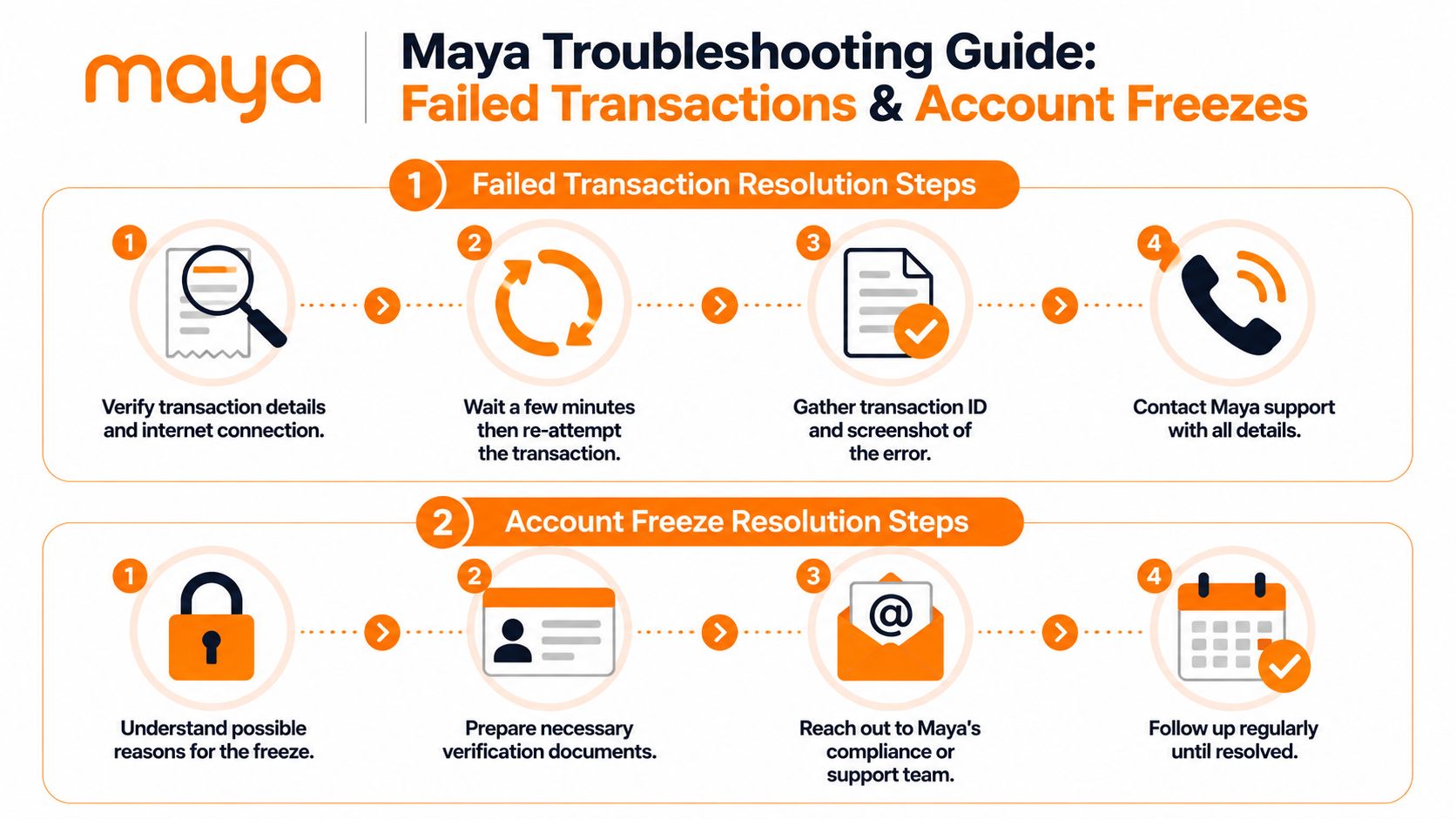
Support expectations also matter. Consumer feedback tied to Maya's support environment indicates users may face queue waits of at least 10 minutes, and despite over 5,000 recorded calls, the reported full resolution rate is 9%, which is why careful documentation and follow-up matter so much according to Maya support data and feedback details.
When a transaction fails or gets stuck
A failed transaction can mean several different things. The app may show an error, the merchant may say no payment was received, or the money may appear deducted without the intended result.
Work through it in order:
Check whether the amount was deducted.
If no deduction happened, the issue may be a failed attempt rather than a lost payment.Look for the transaction entry inside Maya.
A transaction record is stronger than memory. Note the exact time and status.Take screenshots from both sides if another service is involved.
That includes the Maya history and the merchant or platform history.Avoid repeated rapid retries.
Multiple attempts can make the record messier and harder to explain.Report the case with one clean narrative.
Keep it simple: what you tried, what happened, and what proof you have.
A good support message sounds like this:
I attempted a payment using Maya. The transaction shows in my account history, but the receiving platform did not credit it. I have screenshots of the transaction entry, the on-screen error, and the platform history. Please review and advise on reversal or posting status.
If you're dealing with digital entertainment or wallet-funded gaming, many users first compare the payment path with examples of GCash-compatible earning games and wallet flows to separate a Maya issue from a platform-side delay.
When your Maya account is frozen or locked
An account freeze feels personal, but it usually isn't. Systems can restrict access when they detect something unusual, when a verification issue appears, or when additional review is needed.
Focus on what support needs from you:
- Identify the trigger: Was there a login issue, a device change, or an unusual transaction?
- Prepare your documents: Keep your ID and any relevant account verification material ready.
- Use the proper support path: If there's no active emergency, use the app so you can submit proof clearly.
- Follow up politely and consistently: Persistence helps more than anger.
A practical response plan
Here's a cleaner way to handle a freeze:
| Situation | Best first move | Why it helps |
|---|---|---|
| You can still access parts of the app | Submit a ticket in-app | You create a written record immediately |
| You suspect unauthorised activity | Use the urgent contact path | Immediate intervention matters more than a long written explanation |
| You were asked for verification | Gather documents before replying | Incomplete replies often slow review |
| You already contacted support once | Follow up using the same case trail | A single thread is easier for agents to review |
Keep this mindset: your job is to make the case easy to verify. Dates, screenshots, IDs, and transaction references do more work than repeated complaints.
Resolving Failed Online Casino Deposits
For Filipino online casino players, a failed Maya deposit creates a different kind of stress. The money may seem to have left one side, the gaming balance may not update, and each side may tell you to contact the other first. That's exactly why preparation matters.
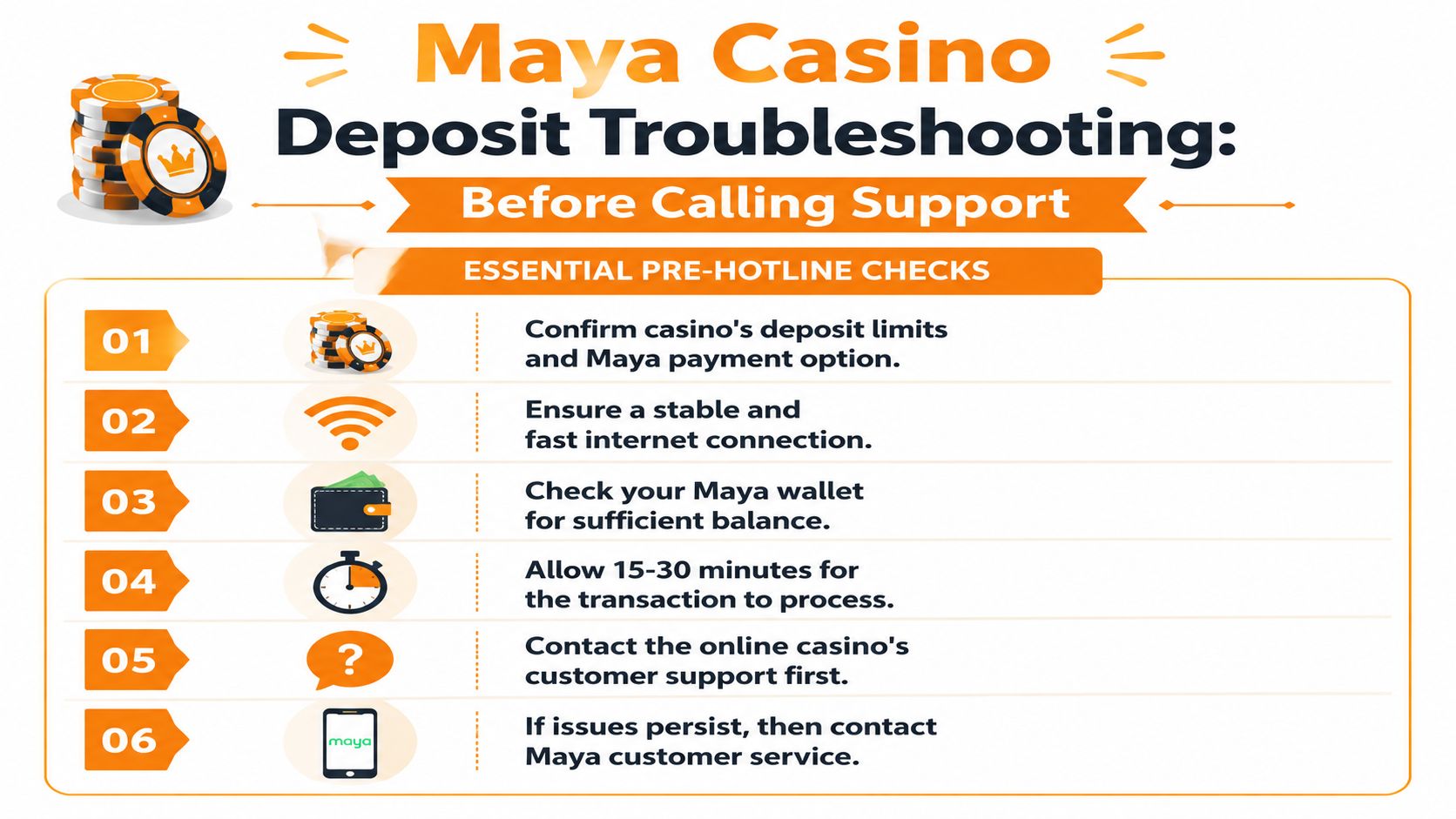
For urgent transaction concerns, Maya lists (+632) 8845-7788 and 1-800-1084-57788 as the key hotline numbers for immediate support access, as noted in Maya's account and transaction concern contact article. But before you call, build your case.
Why preparation matters before you contact Maya
A casino deposit dispute can become a “no record on our side” problem very quickly. If you contact Maya with only a general complaint, the agent has little to investigate beyond your own statement. If you contact Maya with evidence from both the wallet side and the casino side, the case becomes much clearer.
That's especially useful with platforms where players move quickly between deposit methods, app sessions, and game lobbies. If the transaction involved a platform such as the 90 JILI app guide for mobile casino access, the app environment itself can add confusion unless you capture the exact screen where the deposit failed or stalled.
The exact evidence to gather first
Before you contact Maya, collect all of this:
- Your player ID or username from the casino account
- The exact deposit amount
- The time and date you made the attempt
- A screenshot of the error message, if one appeared
- A screenshot of the casino wallet or deposit history
- Your Maya transaction record, if it appears in-app
- Any reference or ticket number from the casino's support team
Contact the casino support team first and ask one direct question: Did the deposit attempt reach your system, and can you give me a ticket or reference for the investigation?
That step matters because it changes your Maya report from “my deposit failed” to something much more useful:
I attempted a deposit to my casino account, and the platform has already logged the issue under its own ticket number. I'm attaching the casino-side record, my player ID, and my Maya transaction details so you can trace whether the payment posted, reversed, or remained pending.
What this approach solves
It prevents three common problems:
- Missing evidence that forces support to ask basic questions later
- Platform mismatch where Maya and the casino use different timestamps or identifiers
- Blame shifting between wallet provider and merchant platform
When you present both sides clearly, the issue stops looking like a vague complaint and starts looking like a traceable transaction dispute.
Your Maya Support Strategy and Security Checklist
When support is needed, the best approach is simple, not dramatic. Match the urgency to the channel, prepare your records before you speak to anyone, and keep all follow-ups in one clean thread whenever possible.
A simple support strategy under pressure
Use this sequence:
- Emergency first: If the issue involves immediate financial risk or suspicious activity, use the emergency phone path.
- Routine concern next: If it's a non-urgent problem, start in the Maya app so the case is logged properly.
- Evidence always: Keep screenshots, transaction details, and any merchant-side records ready before you reach out.
- One case trail: Don't scatter the same issue across multiple unrelated messages if you can avoid it.
That last point is easy to overlook. When support teams review account problems, a neat timeline helps them far more than repeated retellings.
Security habits that prevent repeat problems
Good support strategy starts before anything goes wrong.
- Check recipient details carefully: Review names, account identifiers, and payment targets before confirming.
- Protect your login: Don't share codes, and be cautious with links sent by message or social media.
- Watch for suspicious prompts: If something feels off, stop and verify inside the official app.
- Keep records of important transactions: Screenshots and receipts make future disputes easier to resolve.
- Respond quickly to unusual activity: Delays can make urgent cases harder to contain.
The smoothest support experience usually starts with prevention. Fewer mistakes and better records mean fewer stressful calls.
If you searched for PayMaya hotline 24/7, the most important thing to remember is this: Maya does provide round-the-clock help for emergencies, but not every issue belongs on that line. Once you choose the correct channel and bring the right evidence, you give yourself the best chance of a faster, calmer resolution.
If you want a PAGCOR-licensed gaming platform with a broad range of slots, e-games, and a beginner-friendly offer, visit Insta Play Online Casino. It's built for Filipino players who want a secure, convenient place to explore trusted providers and enjoy a straightforward online casino experience.





Join thousands of gaming professionals receiving the latest iGaming news, regulatory updates, and market insights.
