

You're probably in the same spot a lot of Filipino players end up in. You want to play JILI games on your phone, you search for the 188 JILI app, and suddenly you're looking at random download pages, copied logos, mirror sites, and app files you can't verify.
That's where most mistakes happen.
The primary issue usually isn't how to install an app. It's how to avoid installing the wrong one. If you care about safe access, smooth cash-in and cash-out, and a platform that operates under local rules, the smarter move is to use a PAGCOR-licensed partner path instead of downloading from an unverified source.
This guide takes that route only. It focuses on accessing JILI games through a regulated platform, keeping the setup practical, the checks simple, and the playing experience straightforward.
Table of Contents
- Why a Safe 188 JILI App Matters
- Locating and Installing the App via Insta Play
- Creating Your Account and Claiming the ₱3000 Bonus
- Exploring JILI Games Within the App
- Managing Your Account and Playing Responsibly
- Troubleshooting Common App Issues
Why a Safe 188 JILI App Matters
When players talk about the 188 JILI app, they're usually talking about one thing. They want fast access to JILI slots and e-games on mobile without dealing with fake pages, broken APKs, or shady redirects.
That concern is valid. The search results around this topic are crowded with promotional pages, affiliate copies, and download claims that don't always tell you who operates the service. That's why the safer approach is to use a PAGCOR-licensed access point rather than chasing direct files from unknown sources.
A licensed route matters because it changes the whole risk profile. Instead of trusting a file shared on a forum, reposted on social media, or hosted on a cloned page, you're dealing with a platform that has to operate within Philippine regulatory expectations. That affects how accounts are handled, how support works, and how players check legitimacy before depositing.
One practical example is browsing a regulated casino hub such as Mega Panalo Casino on Insta Play from the official site environment instead of relying on random search results that may only be using the JILI name for clicks.
What usually goes wrong with unsafe downloads
Most bad experiences come from a few repeat problems:
- Fake app files that ask for permissions unrelated to gaming
- Copied websites that mimic a casino brand but send players to unrelated payment pages
- Outdated installers that fail after login or freeze mid-session
- Support dead ends where there's no verified channel to recover an account
Practical rule: If you can't clearly identify who runs the platform, where the download originates, and how support is reached, don't install it.
What works better
A safer workflow is simple. Start with the operator's official site, verify the brand environment, use the site's own app access method, then register and deposit only after you've checked the basics.
That process isn't flashy, but it avoids most of the nonsense players run into. For mobile casino play in the Philippines, legitimacy is part of convenience. A shortcut at download stage often creates a bigger hassle later.
Locating and Installing the App via Insta Play
If you're trying to get the 188 JILI app on your phone, the cleanest method is to begin from the official platform site and install from there. Don't type random phrases into search and tap the first APK page you see. That's the habit that creates avoidable risk.
Use the site itself as your filter. If the app access is legitimate, the official page should point you to the correct mobile route, whether that's a direct installer, a browser-based shortcut, or an iOS-friendly flow.
Start from the official site, not search results
Open the official site in your mobile browser. From there, look for the app download area, mobile access prompt, or QR code. If you want a reference point for that path, the PH777 casino app download page shows the kind of official on-site routing you should be looking for rather than third-party download pages.
Before you install anything, pause for a minute and check these signs:
| Check | What to look for | Why it matters |
|---|---|---|
| Site identity | Consistent branding and working navigation | Cloned pages often have broken menus |
| Download path | Installer or prompt originates from the official domain flow | Reduces the chance of altered files |
| Support presence | Visible contact or help options | Real operators don't hide support |
| Payment flow | Familiar and consistent cashier layout | Fake pages often look unfinished |
If the page feels stitched together, has pop-ups that keep changing, or throws you into unrelated tabs, back out immediately.
Android installation steps
Android users usually have the most direct install path, but that also means you need better judgement.
Open the official site on your Android phone.
Find the mobile download button or app access prompt.Download the installer only from that page.
Don't switch to another tab and search for a “faster APK”. That's where fake files usually appear.If Android blocks the install, review the permission message carefully.
You may be asked to allow installation from your browser or file manager. This setting lets your phone install a file outside the Play Store. It does not mean every file is safe, so only allow it for a file you downloaded from the verified site path.Install the app and open it immediately after completion.
Check that the branding, login screen, and menu style match the official site you came from.Turn the install permission back off if you don't need it anymore.
That's a small but sensible habit.
iPhone and iPad installation steps
iOS often works differently. In some cases, you'll use a web app shortcut rather than a traditional App Store-style download. In others, the platform provides a guided mobile access method.
A practical iPhone flow looks like this:
- Open the official site in Safari
- Log in or locate the mobile entry prompt
- Follow any on-screen instruction to add the platform to your Home Screen
- If iOS asks you to trust a profile or review permissions, read each step carefully before accepting
What doesn't work well on iPhone is trying to sideload from unofficial instructions copied from forums or chat groups. Those methods create more access issues than they solve.
A quick install checklist before first login
- Check your connection: Weak data can interrupt the file or initial app load.
- Use device storage with room available: Low storage often causes partial installs.
- Avoid VPN switching during setup: It can trigger login or session confusion.
- Use your own device: Shared phones create account security problems later.
If the app opens cleanly and the interface looks consistent with the official site, you're in a good place to move on to registration.
Creating Your Account and Claiming the ₱3000 Bonus
Installation is the easy part. The step deserving more attention is registration, for it determines whether players create a clean, manageable account, or they rush, mistype details, and end up locked out during verification or withdrawal.
If you're setting up access to JILI games through the mobile platform, take an extra minute here. It saves much more time later.

Register without rushing
Most registration forms ask for familiar basics such as a mobile number, username, password, and sometimes a referral or promo field. Enter your details carefully and keep them consistent with information you can reliably access later.
Use a password that's unique to this account. Don't recycle the same password you use for Facebook, email, or mobile banking. If one account gets exposed elsewhere, reused passwords turn one problem into several.
A good first setup habit looks like this:
- Choose a username you'll remember: Don't make it so random that you forget it by the weekend.
- Use an active mobile number: Recovery steps usually depend on it.
- Write down your login details safely: A password manager is better than screenshots in your gallery.
- Check every digit before submitting: Small typos become support issues later.
A lot of “my account won't open” cases start with a registration typo, not a system error.
If the platform asks for confirmation by SMS or in-app verification, finish that step immediately. Don't postpone it. Half-complete accounts tend to create confusion when a player tries to claim promos or make their first cash-in.
How to handle the welcome bonus properly
The welcome offer is part of why many new users look for this setup in the first place. The publisher states that new users are welcomed with a Free ₱3,000 Bonus, and that figure is part of the platform background provided for this article.
The practical part isn't just seeing the promo banner. It's making sure you qualify for it under the platform's actual rules. Before you tap claim, read the terms shown inside the app or on the official site. Focus on the trigger, the game coverage, and any playthrough or release conditions that may apply.
If you want a related reference point for bonus-focused access, the slot free credit page is the kind of official on-site promo path worth checking instead of relying on copied bonus posts.
What usually works when claiming
Different platforms handle bonuses differently, but these actions are generally the safe pattern:
- Complete registration first
- Verify any required contact detail
- Check the Promotions or Bonus area inside the app
- Read the eligibility note before claiming
- Confirm whether the bonus is automatic or manual
- Take a screenshot of the offer page if the app allows it
That last habit helps if you need support later. You're not arguing from memory. You're referring to the offer that appeared on your account screen.
Trade-offs new players should understand
Bonuses are useful, but they can also distract players from the basics.
Here's the trade-off in plain terms:
| If you focus only on the bonus | What you may miss |
|---|---|
| Fast registration | Incorrect account details |
| Quick first deposit | Unread promo conditions |
| Immediate gameplay | No record of what you claimed |
| Multiple sign-up attempts | Duplicate account issues |
The better approach is boring but effective. Register once, verify properly, review the promo terms, then start with a small and controlled first session.
Exploring JILI Games Within the App
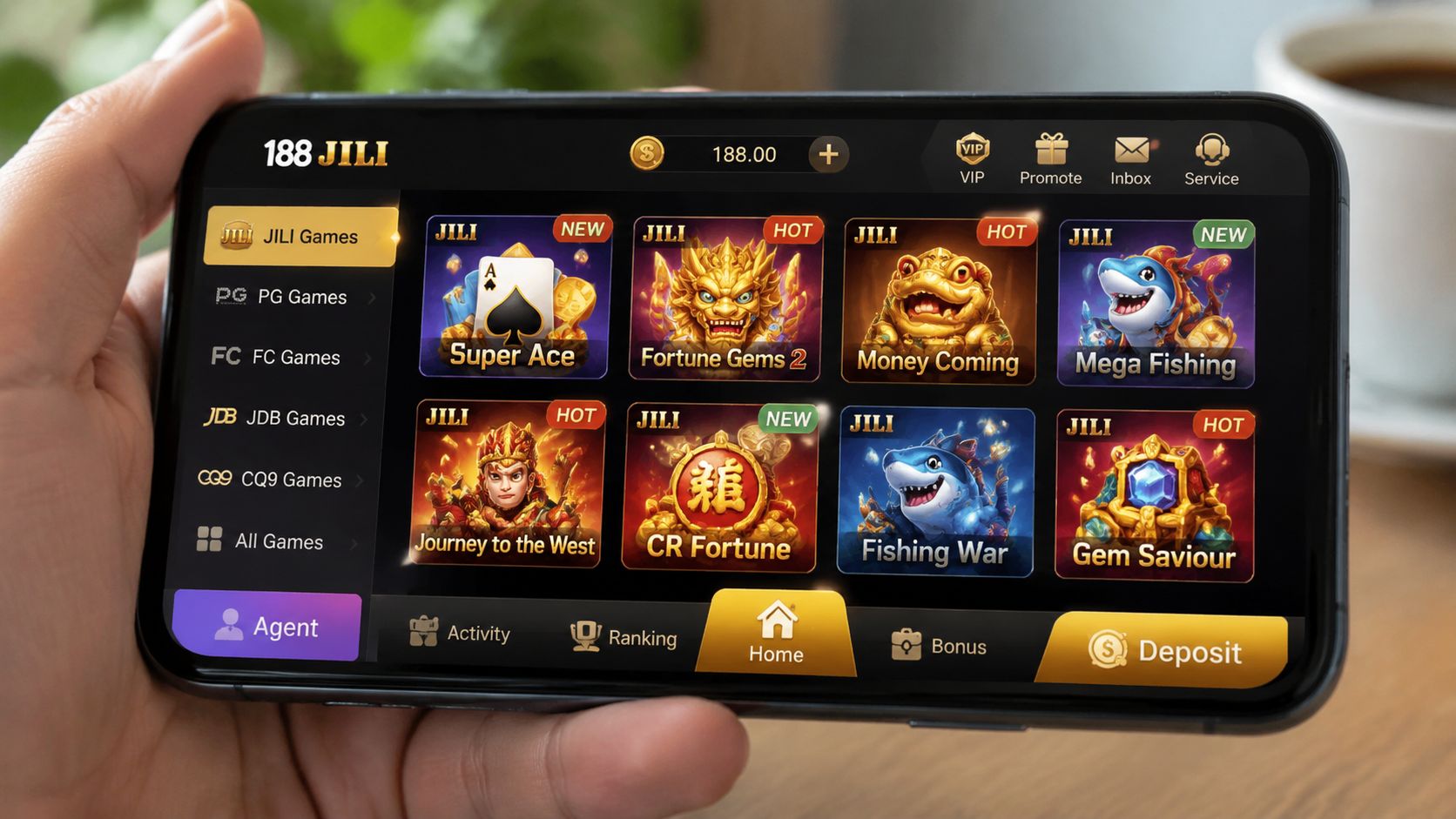
Once you're logged in, the app stops being a setup task and starts feeling like what you came for. This is the part where most players want to get straight into the JILI lobby, scan the thumbnails, and test a few games before settling on a favourite.
That's fine. Just don't tap blindly through the homepage and assume every slot tile belongs to the same provider. Mobile casino apps usually group games by provider, category, or featured placement.
Finding the JILI lobby fast
In most mobile layouts, you'll find JILI through one of these paths:
- Provider tab: A menu that groups games by studio
- Slots section: The broad slot category where JILI titles appear among other providers
- Search bar: Useful if the app lets you type a specific game name
- Featured banners: Sometimes the quickest route when JILI promotions are active
If you want a direct example of a JILI-focused platform path, the 90 JILI app page is the sort of internal route that helps players find the right provider context faster.
What works best in practice is opening the provider list first. That cuts down the noise. Instead of scrolling past card games, live tables, fish games, and unrelated slot studios, you go straight into the JILI shelf and browse within one ecosystem.
How to choose your first games
Most players don't need a huge strategy on day one. They need a clean way to test the app and learn how the game lobby behaves.
A useful first-session approach is:
- Start with one familiar-looking title: Theme matters more than people admit. If the symbols and style make sense to you, you'll settle in faster.
- Check how the game loads: Slow loading, stretched screens, or missing buttons can signal device or connection issues.
- Review the control layout: Look for bet controls, autoplay options if available, paytable access, and exit button placement.
- Play short sessions first: That helps you learn the pacing of both the game and the app.
Don't judge the whole 188 JILI app experience by one game round. Judge it by navigation, loading stability, and how easy it is to move between lobby and gameplay.
Some players like energetic titles with louder visuals. Others prefer simpler layouts that make stake controls easier to read on a smaller screen. Both are valid. The key is to use the first session as a feel-out period, not a chase.
A small but useful habit is to favourite the games you enjoy. Once your list starts getting longer, that saves you from repeating the same scrolling every login.
Managing Your Account and Playing Responsibly
A safe start doesn't mean much if your long-term habits are careless. For mobile casino play, account security and responsible play sit in the same bucket. Both are about control.
Players often think safety means “I used the correct download link.” That's only the first layer. After that, your own habits matter more than the installer.
Account protection habits that actually help
The biggest account mistakes are simple ones. Shared passwords, saved login details on borrowed phones, and clicking links sent through random messages are still common.
Use these habits instead:
- Keep one password for this account only: If another service gets compromised, your casino login stays separate.
- Avoid logging in through message links: Open the official site or app manually.
- Don't share your OTP or recovery code: Real support doesn't need you to hand over control of the account.
- Log out on devices that aren't yours: Convenience isn't worth the risk.
One practical support-related reminder is that payment and withdrawal questions often become more stressful when players are already logged into the wrong page or using a copied site. If you're checking account cash-out concerns, review official workflow examples such as the Arena Plus withdrawal guide and apply the same caution to any casino payment step. Start from the official platform, not from forwarded links.
Responsible play is part of safe play
Responsible gaming isn't a lecture. It's just good account management.
Set your own boundaries before you start a session. Decide how much you're comfortable using, how long you plan to play, and what result ends the session. If you only make those decisions while already emotional, they usually become bad decisions.
Here's a simple framework that works better than vague promises:
| Limit type | Practical example |
|---|---|
| Session time | Decide your stop point before opening the lobby |
| Spending cap | Use only an amount you can afford to lose |
| Win exit point | Leave part of a good run untouched |
| Loss stop point | Don't chase immediately after a rough stretch |
Safe play isn't only about where you download. It's also about whether you can stop when you said you would.
Watch for warning signs in your own behaviour. If you keep increasing your stake just to recover losses, feel irritated every time you log out, or start treating gaming money like bill money, step back. A break is often the smartest move available.
The most experienced players I know aren't the ones who stay logged in longest. They're the ones who can leave the app without drama.
Troubleshooting Common App Issues
Even when you use a proper install path, mobile gaming apps can still run into hiccups. Most of them are routine. The trick is knowing which issue you can solve in a minute and which one needs support.
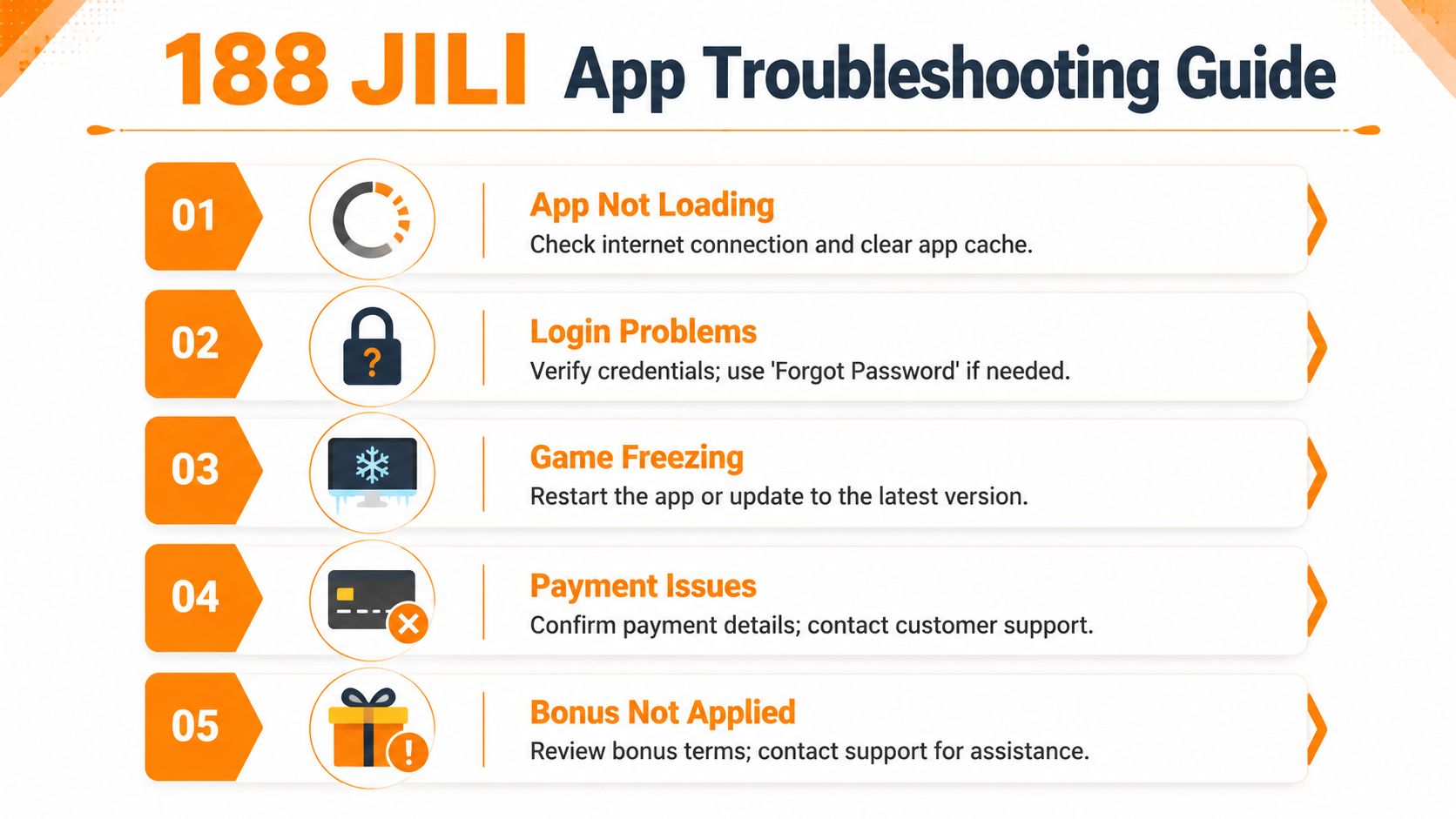
Use the quick fixes below before reinstalling or assuming your account has a bigger problem.
App won't load or keeps crashing
This is usually a device, cache, or connection problem.
Try these in order:
- Close the app completely and reopen it
- Switch between mobile data and Wi-Fi
- Clear app cache if your device allows it
- Restart your phone
- Update or reinstall only from the official site path
If the app opens but games don't load properly, check whether your phone storage is nearly full or whether too many background apps are running.
Login errors and password problems
Most login failures aren't system outages. They're input issues.
Check the basics first:
- Correct username format: Some players mix up username and mobile number.
- Password case: Uppercase and lowercase mistakes happen more than people think.
- Saved autofill errors: Old credentials often stay in your phone.
- Connection stability: Weak signal can fail the login request.
If there's a Forgot Password option, use that rather than repeatedly guessing. Too many failed attempts can create extra delays.
Bonus not showing or not applied
This one frustrates new users because it feels personal, but it often comes down to incomplete steps or unread conditions.
Run this check:
- Open the Promotions or Bonus page in the app
- Confirm you finished registration fully
- Check whether verification is still pending
- Review whether the offer requires a manual claim
- Look at the games covered by the promo
If you took a screenshot during the claim process, its utility becomes clear.
If a bonus doesn't appear, don't create a second account to “try again”. That usually makes the situation worse.
Payments or withdrawal concerns
When a payment issue happens, slow down. Don't keep sending transactions one after another.
Start with a clean review:
| Problem | First check | Next move |
|---|---|---|
| Deposit not reflected | Payment details and recent transaction status | Wait briefly, then contact support through the official channel |
| Withdrawal delayed | Account details and any pending review notice | Check account messages before repeating the request |
| Cashier page not loading | Browser or app session issue | Log out, reopen, and try again |
| Wrong payment route | Site authenticity | Return to the official app or site before retrying |
If support is needed, prepare the basics before chatting: your username, device type, time of issue, and a screenshot if available. That makes resolution faster and cleaner.
A lot of mobile gaming problems feel serious in the moment, but they're usually fixed by one of three things. Correct login details, a stable connection, or using the proper official path.
If you want a regulated way to access JILI games on mobile, Insta Play Online Casino is the official site route discussed in this guide. Use the site directly, verify each step before you install, read the bonus terms carefully, and keep your play controlled from the start.





Join thousands of gaming professionals receiving the latest iGaming news, regulatory updates, and market insights.
