


You've just won on Arena Plus, refreshed your balance twice to make sure it's real, and now you want the only part that matters. Money in your GCash account. That's usually the moment players get nervous, because cashing out feels simple until one small mismatch stalls the request.
That worry isn't random. GCash withdrawal issues have been a documented friction point for ArenaPlus users, and tutorials specifically exist to help players fix those problems. One especially painful example involved a player who reported a ₱177,000 win through a GCash-linked setup that was later voided by the betting site, which is exactly why it pays to understand the withdrawal flow and the rules before you press confirm, as noted in this ArenaPlus withdrawal discussion and user report roundup. If you also play other games that can earn money thru GCash, the same habit applies. Cash-out success usually starts before the withdrawal screen appears.
Table of Contents
- From Winning Bet to GCash A Player's Introduction
- Setting Up for a Successful Withdrawal
- The Arena Plus to GCash Withdrawal Process
- Understanding Withdrawal Limits and Timelines
- Troubleshooting Common Arena Plus Withdrawal Issues
- Final Reminders for Safe and Smart Cashing Out
From Winning Bet to GCash A Player's Introduction
The emotional jump from winning a bet to requesting a withdrawal is bigger than most first-time players expect. While you're playing, everything feels fast. Once you're withdrawing, every field matters. A wrong number, an unverified account, or a delayed confirmation suddenly feels much more serious because it's now your money on the line.
Most players don't struggle because the steps are impossible. They struggle because the platform expects precision. Arena Plus to GCash withdrawals work best when your account details line up cleanly and your expectations are realistic from the start.
The safest mindset is simple. Treat withdrawal like a banking task, not a gaming task.
There's also the high-stress side of this that people often only discover after something goes wrong. That reported ₱177,000 voided win hangs over a lot of player conversations because it reminds everyone that the issue isn't always just a delayed payout. Sometimes the bigger problem is whether the win itself is honoured. That's why a practical guide needs to do more than repeat the basic steps.
Three things usually separate smooth withdrawals from messy ones:
- Account accuracy: Your registered mobile details have to match exactly where required.
- Verification readiness: If your account isn't fully cleared, the request can slow down or stop.
- Proof habits: Screenshots, SMS confirmations, and transaction records matter when support gets involved.
A first-time Arena Plus GCash withdrawal should feel boring. That is the goal. You want no surprises, no guesswork, and no panicked searching after you hit submit. The rest of this guide stays focused on what Filipino players need in that moment. What to prepare, what to tap, what commonly breaks, and what to do when the problem is bigger than a simple app error.
Setting Up for a Successful Withdrawal
A smooth cash-out usually starts before you touch the Withdraw button. Most failed attempts come from setup issues that looked small at first. The good news is that these are preventable if you slow down and check the right things.
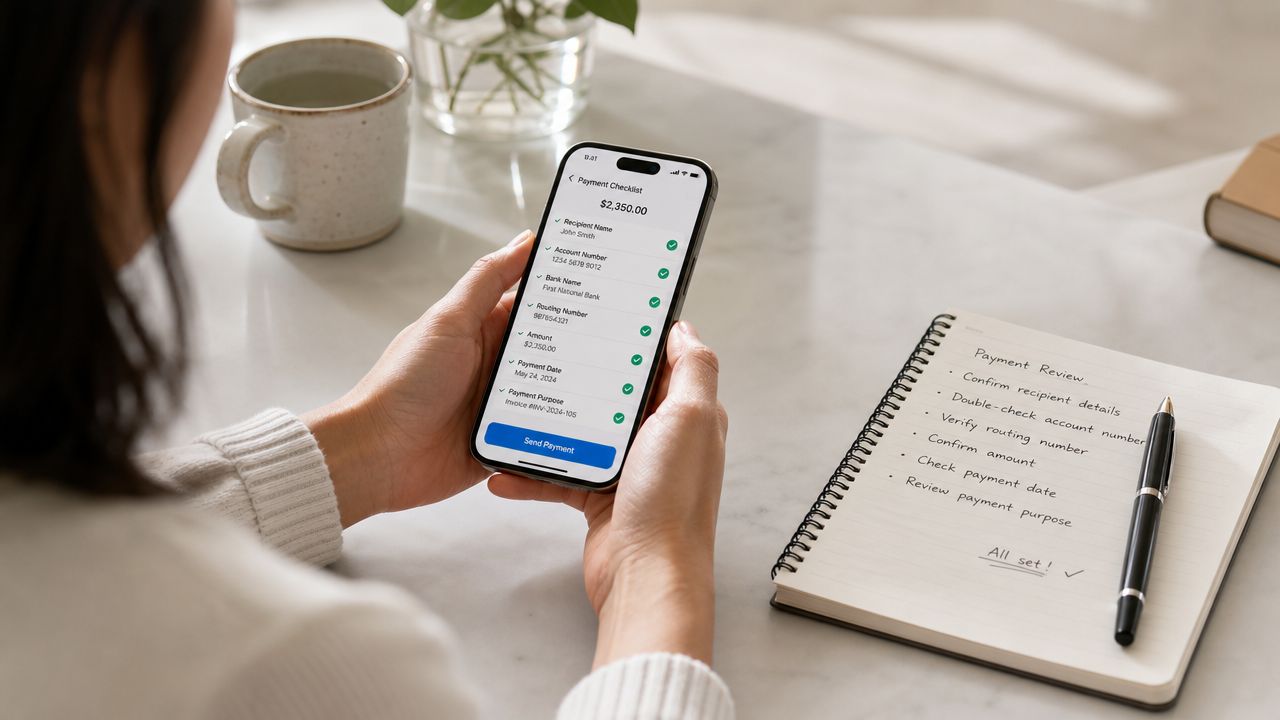
Match your details before anything else
The most important prep step is making sure your Arena Plus account details and your GCash details belong together cleanly. If your mobile number on one side doesn't match the other, you're setting yourself up for a failed link or a stalled withdrawal request.
Imagine a name on a parcel delivery. If the address is right but the receiving details don't match the system's expectation, it doesn't move cleanly. That's how a lot of withdrawal trouble starts.
Before withdrawing, check these basics:
- Mobile number: Use the same number tied to your GCash account.
- Account ownership: Don't try to route a withdrawal to someone else's wallet.
- Current access: Make sure you can still receive SMS and log in to the GCash account without issues.
If your GCash account still needs account checks on its own side, it's smarter to fix that first. This GCash verification guide is useful if you need to sort out that part before cashing out.
Treat verification like part of the withdrawal
Players sometimes think verification is a separate admin chore. It isn't. In practice, it's part of the withdrawal itself because an incomplete or questionable account profile gives the platform a reason to hold the request.
Practical rule: Don't wait until after a win to clean up your account details. Fix them while your balance is still untouched.
A strong setup routine looks like this:
- Review your profile first: Check the number, name format, and any required identity details inside your account.
- Use updated apps and a stable connection: Small app-side issues can create confusion that looks like a payment failure.
- Keep one active wallet path: If you regularly switch numbers or devices, expect extra friction.
What works is consistency. One player, one wallet, one matched mobile number, one verified account. What doesn't work is rushing through the form after winning and hoping the system figures it out.
The Arena Plus to GCash Withdrawal Process
A lot of players get nervous at this stage for a simple reason. The money is already won, but one wrong tap can turn a clean cash-out into a support problem.
Start from the correct area of the app or site
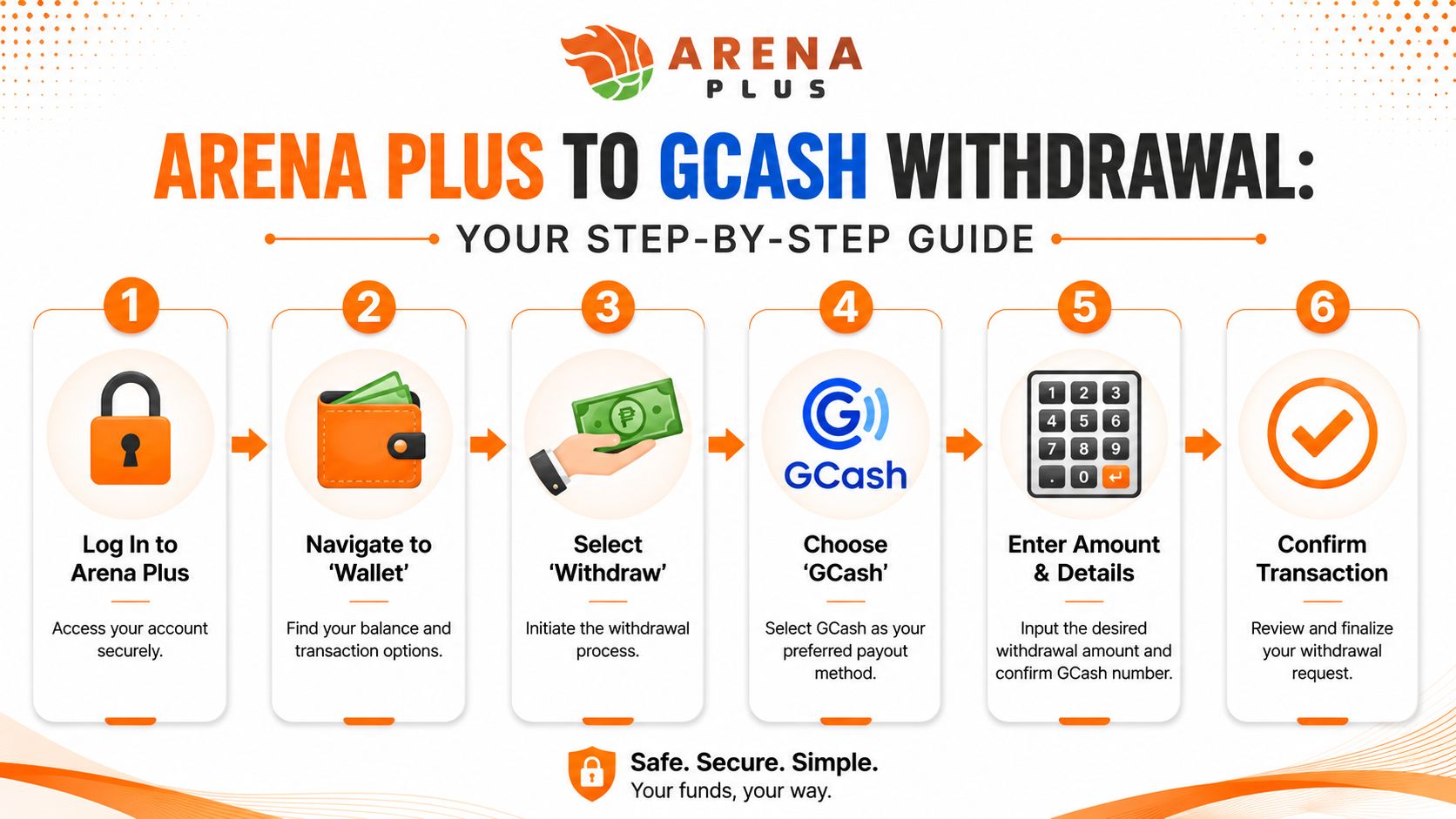
The usual Arena Plus withdrawal path is clear if you follow the menu in order. Log in, tap the Astig icon, choose Withdraw, enter the mobile number linked to your GCash account, select GCash, type the amount, enter the GCash wallet password, accept the Terms & Conditions, then wait for the SMS confirmation, based on this Arena Plus withdrawal walkthrough video.
The order matters. Arena Plus is stricter than players expect once real money is leaving the account, especially after a bigger win. If a large payout is later flagged, delayed, or even voided for review, your best protection is a clean request history with matching details and no rushed edits.
For readers who prefer seeing the flow in motion, this video can help:
Treat the number and wallet link like a security check
The mobile number field decides more than most first-time users realize. Entering the wrong number, selecting the wrong wallet, or changing linked details while a request is pending can turn a normal withdrawal into a manual review case.
Check the number inside GCash first. Then compare it with what appears in your Arena Plus account before you type anything into the withdrawal form.
I also recommend slowing down at two points:
- Before entering the amount: Confirm you are cashing out to the wallet you actively control.
- Before final submission: Read the mobile number again, digit by digit.
Players who keep extra wallets for promos or side spending should be careful here. If you use slot free credit offers while building up a withdrawable balance, keep that play budget separate from the wallet you plan to use for cash-out. It makes your records cleaner if support ever asks for proof of account ownership or transaction history.
Submit once, then protect the trail
After you enter the amount, wallet password, and terms acceptance, submit the request once and let the system process it. Repeating the same request out of panic usually creates a mess.
If the SMS does not arrive right away, wait. Do not switch numbers, relink wallets, or log in and out across several devices just to “refresh” the withdrawal. Those moves can make the account look inconsistent at the exact moment the payout is being checked.
Use a simple post-submission routine:
- Screenshot the confirmation page
- Save the SMS once it arrives
- Write down the amount and submission time
- Leave the linked GCash details untouched while the request is pending
That last habit helps more than players think. It also matters in the two stressful cases people rarely prepare for. First, if a large win is voided or held for review, support will usually move faster when you can show the original request, amount, and timeline without conflicting account changes. Second, if you later need to safely manage or replace your GCash link, do it only after the pending withdrawal is fully resolved, not in the middle of it.
Understanding Withdrawal Limits and Timelines
The money side of the process is where expectations need to stay realistic. Some players expect instant arrival because GCash itself often feels fast. Arena Plus doesn't always work on that same immediate rhythm.
What the minimum really means in practice
ArenaPlus imposes a minimum withdrawal limit of approximately $10, or roughly ₱580, and most transactions are processed within 24–48 hours, according to the platform's Arena Plus withdrawal guide. That threshold exists to support operational efficiency while still giving players a practical path to move funds into wallets such as GCash.
That means two things in real use. First, very small balances may not be withdrawable yet. Second, a clean request can still take time even when everything is correct.
Players often read “processed” and assume “already inside my wallet”. Those aren't always the same moment. Processing is the platform side. Arrival can still vary a bit depending on the receiving channel.
A good withdrawal plan starts with patience. Submit once, document it, then give the window time to work.
If you like stretching value from small balances while waiting to reach the minimum, some players explore slot free credit options elsewhere. Just keep your withdrawal target separate from your play budget.
Arena Plus to GCash Withdrawal Details
| Metric | Detail |
|---|---|
| Minimum withdrawal | Approximately $10, roughly ₱580 |
| Typical processing window | Most transactions are processed within 24–48 hours |
| Why the minimum exists | Supports operational efficiency |
| What to expect after processing | GCash funds may arrive promptly after the window, though timing can still vary slightly |
The practical trade-off is simple. A standardised threshold keeps the platform's payout flow organised, but it also means players need to plan around that minimum instead of expecting every leftover balance to be cashable on demand.
Troubleshooting Common Arena Plus Withdrawal Issues
A failed cash-out feels different when the money is already mentally spent. You win, you send the withdrawal to GCash, then the status stalls, throws an error, or worse, a big result gets voided. That is usually the point where players make a second mistake by retrying too fast, changing wallet details, or arguing with support before saving proof.
When the problem is technical
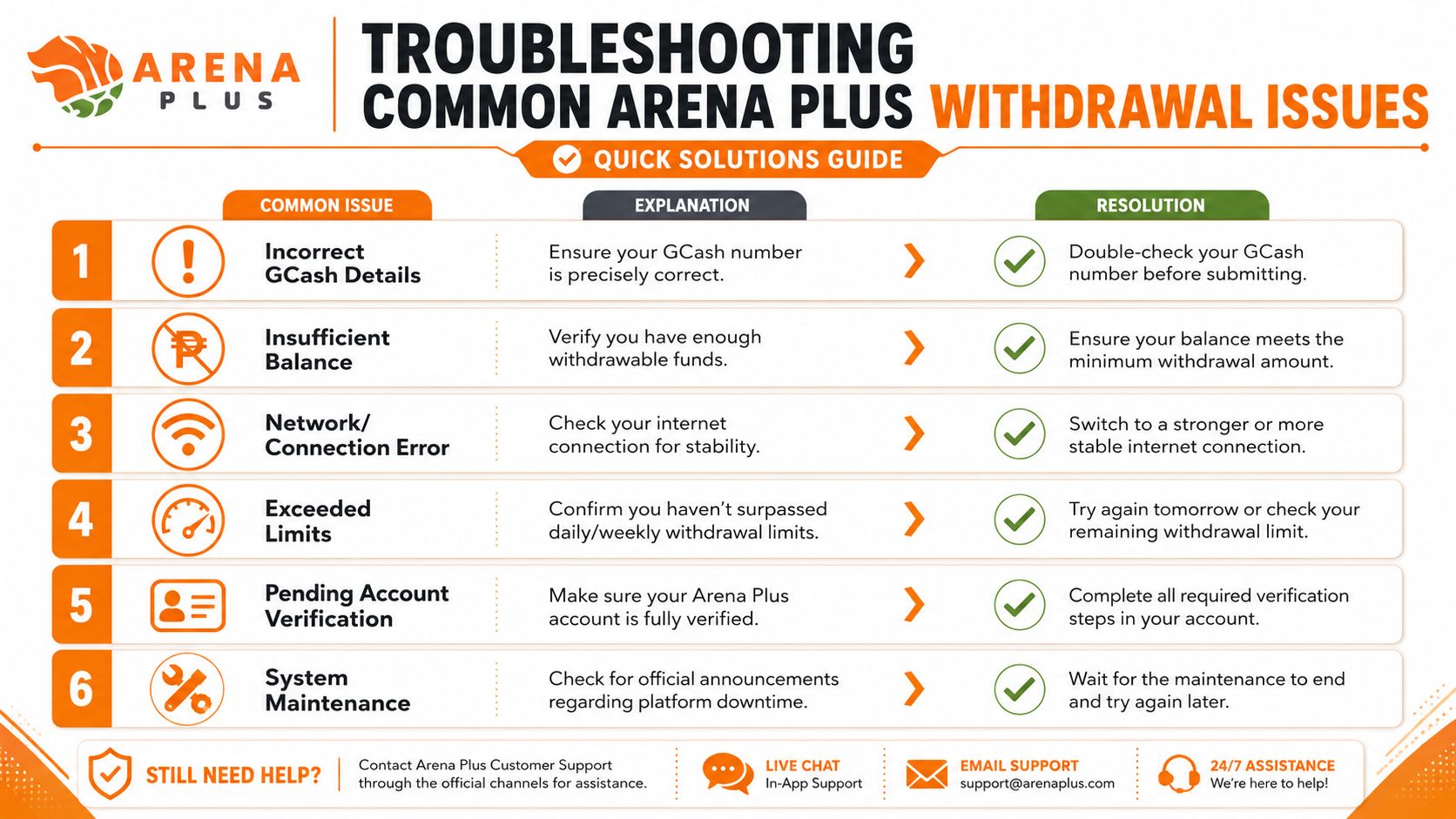
Most Arena Plus withdrawal problems fall into a few familiar buckets. Arena Plus summarizes them in its Arena Plus GCash withdrawal problem guide.
| Reported issue or pattern | Detail from the guide |
|---|---|
| Account verification issues | 35% of failed transactions |
| Standard transaction delays in the Philippines | 15 to 45 minutes |
| Properly linked accounts with correct mobile number sync | Over 95% success rate |
| Verification-related withdrawal failures | 25% |
| Technical glitches | 15% |
Use those numbers the right way. They do not prove your case. They do show that wrong account details and incomplete verification are common enough that they should be checked before you blame the app or the network.
My usual order is simple:
- Check the login session: Log out and back in if the app has been open for a long time.
- Confirm the linked GCash number: One wrong digit or an old SIM is enough to block the request.
- Review verification notices: Any pending identity or account check can hold a withdrawal.
- Look for maintenance alerts: If the platform is doing system work, waiting is safer than repeated retries.
- Contact the right support side: Arena Plus handles the withdrawal request. GCash becomes relevant if the request was already released from the platform side.
Submit once. Then document everything.
Repeated taps create confusion because you can end up chasing two statuses at the same time.
How to handle unlinking or re-linking GCash safely
This is one of the riskiest parts of the process because players often touch it only when something already feels wrong. A phone gets lost, a SIM gets replaced, or the linked wallet no longer feels secure. The urge is to unlink right away. That can make a pending withdrawal harder to trace.
A safer approach is to freeze changes until the current payout is resolved, unless the account itself is compromised and you need to secure it first. In that case, contact support before changing details so there is a written record of why the wallet link changed.
Use this checklist before unlinking or re-linking:
- Check for pending cash-outs: Do not swap wallet details while a request is still processing.
- Save proof first: Screenshot balances, linked account details, and reference numbers.
- Use a GCash account you fully control: You need access to the SIM, OTPs, and wallet login.
- Ask support direct questions: Confirm whether relinking affects pending withdrawals, bonus balances, or account review status.
- Avoid rushed platform-hopping: Even players testing other apps, including guides around the 90 Jili app, should keep wallet changes separate from active cash-out requests.
That last point matters more than it sounds. Mixing account changes with a payout problem makes support work slower because they first have to determine which wallet link is valid.
What to do if a big win is voided
This is the hardest case because the issue is no longer transfer speed. The issue is whether Arena Plus still recognizes the win as valid. A player discussion in this LawPH Reddit thread about an Arena Plus voided bet shows how stressful that gets once the amount is large.
Handle it like a dispute record, not a chat argument.
Save first. Complain second.
Collect these before you message support:
- Bet slip or game history
- Balance history before and after the void
- Screenshots of the win, status change, or void notice
- Deposit or GCash records if they help show the full sequence
- A short timeline with dates and times
Then ask support one clear question at a time:
- What exact rule or event caused the void?
- What record can they provide for that decision?
- Was it a game provider issue, odds issue, duplicate bet issue, or account review issue?
- What is the formal escalation path if you dispute the result?
Keep the conversation in writing. Email or in-app tickets are better than phone calls because they leave a trail. If the replies stay vague, repeat the facts, attach your evidence, and ask for a final written explanation. That gives you something concrete if you decide to explore a formal complaint route later.
A lot of withdrawal stress comes from reacting too fast. Slow down, keep the account stable, save every receipt and screenshot, and make support respond to a clear record instead of a messy story.
Final Reminders for Safe and Smart Cashing Out
The best Arena Plus GCash withdrawal is the one that feels uneventful. You enter the right details, submit once, keep your records, and let the process finish without changing things midway.
Before every cash-out, run through a quick personal checklist:
- Check the number again: Your Arena Plus and GCash mobile details should match exactly.
- Protect access: Never share your wallet password, OTP, or login details with anyone.
- Keep proof: Save screenshots, confirmations, and support replies until the funds arrive.
- Avoid panic edits: Don't unlink, relink, or swap account details while a withdrawal is still moving.
- Know when to stop playing: If the goal is to cash out, cash out. Don't let a pending win drift back into more bets.
Responsible gaming matters here too. Winning feels good, but disciplined withdrawal habits protect that win. If you treat payouts with the same focus you give your bets, you'll avoid most of the common mistakes players make.
If you also want to compare other platforms and promos before your next session, some players browse options like Mega Panalo Casino to see what better fits their play style. Whatever platform you use, the same rule stays true. Withdraw smart, keep your details clean, and don't transact carelessly when real money is involved.
If you want a PAGCOR-licensed option with a straightforward player experience, visit Insta Play Online Casino. It offers access to recognised game providers, a beginner-friendly setup, and a Free ₱3,000 Bonus for new users who want a locally compliant place to play online.